How To Use ChatGPT on Your Mobile WhatsApp
To use ChatGPT on WhatsApp, You need an active WhatsApp account on Android, iPhone, or WhatsApp web.
- Save this number (1-800-2428478) in your phone contacts.
- Alternatively, you can scan the QR code below to chat with ChatGPT on WhatsApp.
- To scan the code, open WhatsApp, click on the chat icon, click on the new contact, and tap Add via QR code. Now, scan the code below to use the app, and click Continue and Chat. This works for both Android and iPhone.

- And that’s it. You have almost finished the setup and are ready to chat with ChatGPT.
- Go to the ChatGPT contact and enter your text prompt to chat. An internet connection is required to chat with ChatGPT.

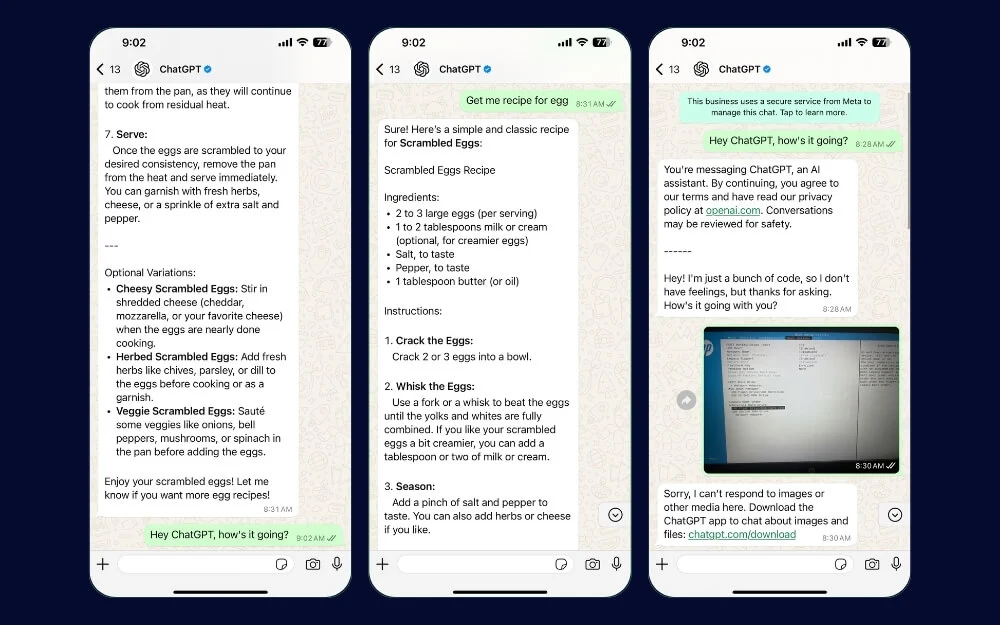
At launch, ChatGPT currently only supports text-based conversations; when you try to upload an image or a PDF file, ChatGPT replies with a message stating that ChatGPT doesn’t support these file types.
The accuracy is similar to that of the ChatGPT web and the mobile app. However, it is not as fast as ChatGPT on the web and its competitor Meta Chat. It is a great addition for someone looking to chat quickly with ChatGPT without installing the app and using WhatsApp as a primary messaging app.